





Best Family Games to Play Together: Board, Browser and Phone Picks
Top Free Online Games: Play Instantly in Your Browser | PokyyGame
Read More
Checkers
Checkers
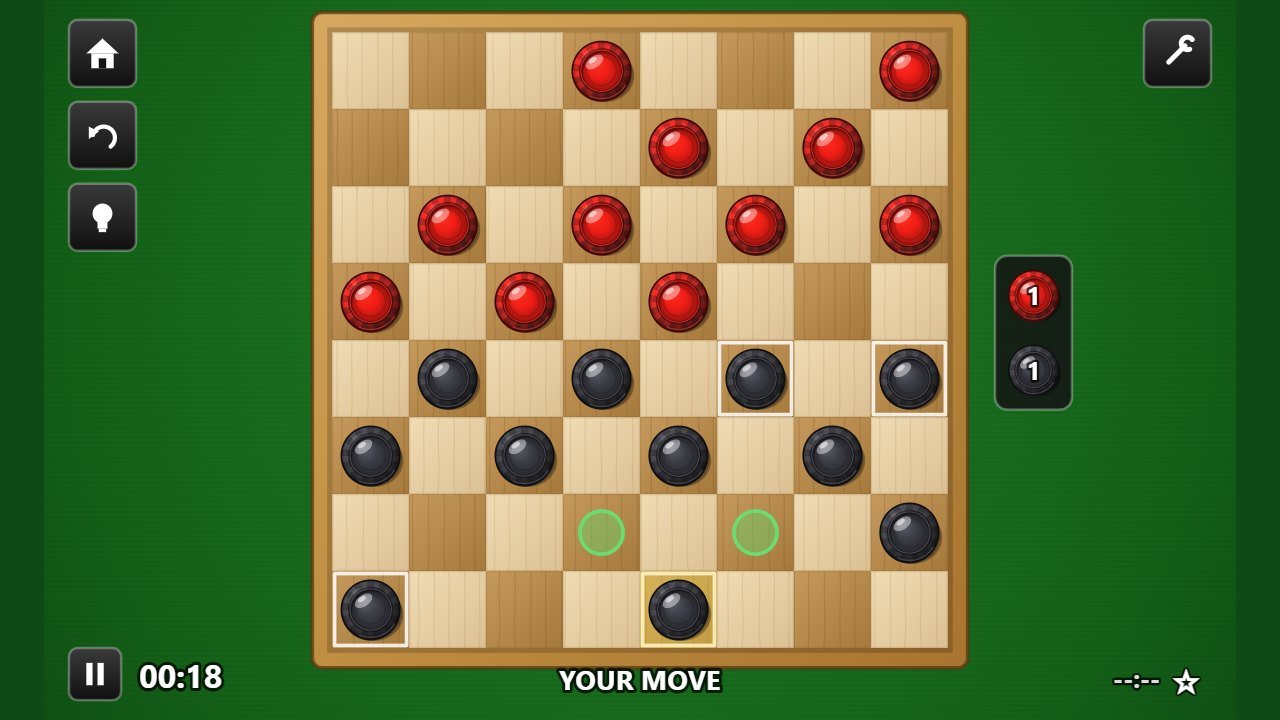
This is a clean, no fuss checkers game online with a light and dark wooden board on green felt, glossy red and black pieces, and a computer opponent that actually thinks before it moves. Slide your pieces diagonally, jump over the other side's pieces to capture them, and reach the far row to crown a king. It's the same game of draughts most of us learned as kids, with a few helpful extras.
Before each game, the options screen lets you swap colors, so you can play black or red. Black always moves first. You can also switch Force Jump on or off.
Regular pieces move one square diagonally forward. To capture, jump over an enemy piece to the empty square right behind it. If another jump is available from where you land, keep going in the same turn. That's a multi-jump chain, and a good one can swing the whole game.
Reach the opposite back row and your piece is crowned, shown with a little gold crown. Kings move one square diagonally in any direction, forward or back. Crowning ends your turn, even if a jump would have been possible.
With Force Jump on, you must capture whenever a capture is available. With it off, jumping is your choice. You win when your opponent has no legal move left, either because all their pieces are gone or because they're boxed in. If both sides go 60 turns without a capture or a regular piece moving, the game ends in a draw.
Captured pieces are counted on a small panel next to the board, so you can see who's ahead at a glance. Few things make a checkers game online feel friendlier than a hint and an undo when you need them.
Yes. Tap a piece to see its moves, then tap where you want it to go. It works the same with a mouse on a computer.
Your fastest win and stars for each difficulty are kept in your browser on that device.
 Top
Must Play


 Top

 Top

 Top

 Top




Top Free Online Games: Play Instantly in Your Browser | PokyyGame
Read MorePlay Watermelon Fruit free online. Drop fruits, merge matching pairs, and grow a giant watermelon. Keep the pi...
Read MorePlay Arrow Escape free online. Tap arrows with a clear lane, keep your 3 hearts, and solve 30 levels of this c...
Read More